


I. The problem▲
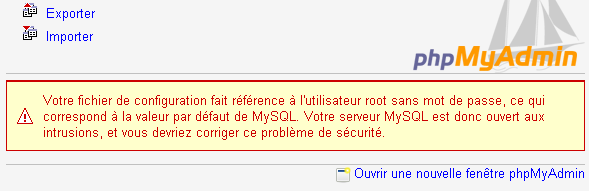
When you enter a fresh new mysql server bundled with phpmyadmin, like wamp or xampp, the root has no password, and you will see this red message. We will need to work inside the database mysql, and in its table users to resolve the problem.

II. The SQL request▲
Click on the SQL tab and enter the request :
UDPATE user SET Password=PASSWORD('restfulwebservices') WHERE user='root'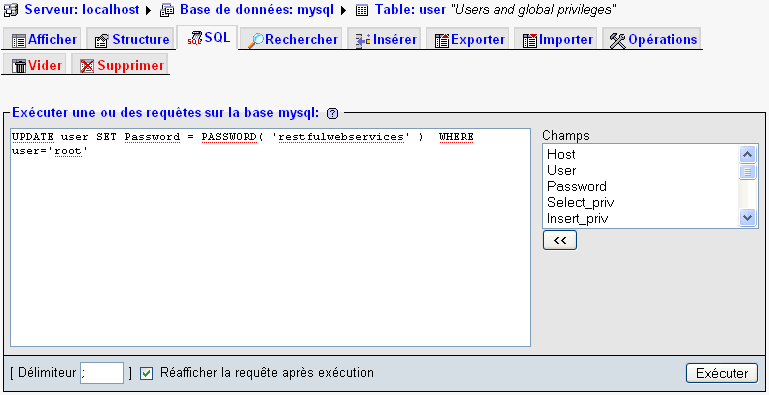
The PASSWORD function will encrypt your password in a strange string.

It means that when you'll attempt to log to the database using 'restfulwebservices', the mysql engine will convert it using the PASSWORD function and see if it match what is in the table user.
PASSWORD is not the MD5 function. And if you attempt UDPATE user SET Password=MD5('restfulwebservices') WHERE user='root', you will no more be able to log in.
III. login with PhpMyAdmin▲
Open the file config.inc.php in your PhpMyAdmin folder :

You will see the parameters used by php scripts of PhpMyAdmin to handle the MySQL database. Here, only the password field interest us.
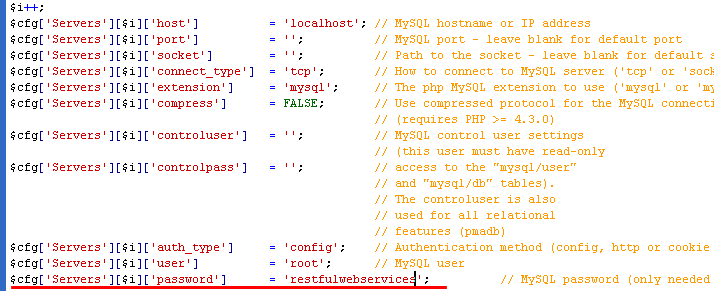
Restart your MySQL engine (if you have doubts, restart your computer :)). When you'll be back, the red message will disappear.

IV. Oups I've made something wrong ! All my datas are lost ?▲
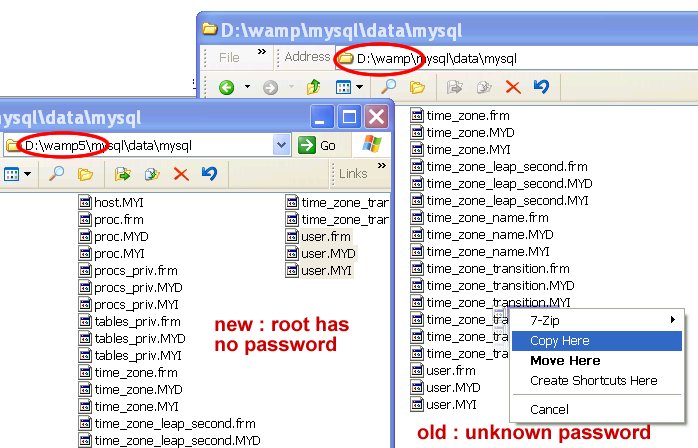
Suppose you have worked two years on a project in your local computer, and you finally wish put a password. But you used MD5 instead of PASSWORD. There are many solutions. One is to re-install another copy of your mysql server with another path. Then copy the user table and datas :
Conclusion▲
This is the minimum job you have to do on a mysql server. But if you are responsible of a production server, you'll have much more workMySQL documentation to do. And if you are a coder, don't forget to fight against SQL injection.